
The Short Years Baby Book
Unbound ApplicationsParenting
4.7316.00 Reviews
- Version
- 9.20
- Installs
- 50.00K
- Age Rating
- Everyone
Screenshots


Our Review of The Short Years Baby Book
 Analysis by Appyee
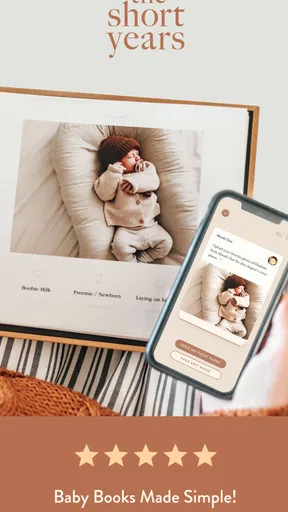
When I first looked at The Short Years Baby Book, I understood the appeal immediately: it is designed for parents who want to preserve the small, ordinary moments of a child’s early life without turning memory keeping into another large project. The idea is simple, but the useful part is the routine behind it. Instead of waiting for a free weekend to build a complete album, I can return briefly, add something meaningful, and gradually create a baby book that feels personal.
This is a free parenting app from Unbound Applications, available for everyone and running on Android devices using version 6.0 or later. The app has reached over 50 thousand installs and holds a 4.7 average from around 386 ratings, which gives a good indication that its focused approach works for many families. It also offers in-app purchases priced at $7.99 per item, so I would treat the free starting point as a chance to understand the workflow before deciding whether any optional purchase fits my needs.
What to expect from The Short Years Baby Book
The first thing to know is that this is not a general-purpose photo editor, a social network, or a replacement for cloud storage. Its purpose is narrower and more useful: helping me turn selected memories into a lasting baby book. That focus makes the experience easier to understand, especially if I tend to collect hundreds of pictures but rarely organize them.
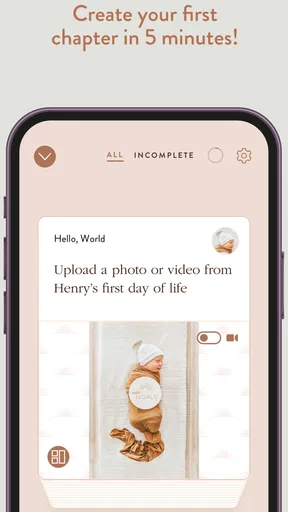
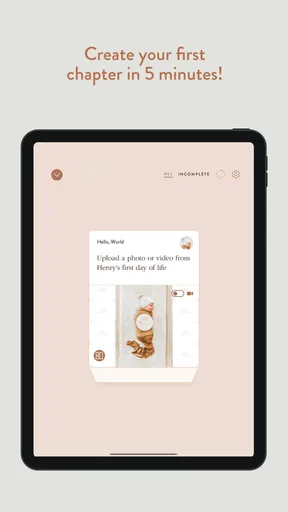
The app’s strongest idea is its small weekly commitment. The suggested rhythm is about five minutes per week, and that changes how I approach it. I do not need to prepare a long entry, write a polished story, or sort every image on my phone. I can choose one moment, add a few words, and move on. The real value is consistency, not producing a perfect page every time.
That makes it a particularly good fit for a first-time parent who wants a structured memory book but has little spare attention. It can also suit relatives who want to contribute memories in a more intentional way, although the person managing the book will probably get the most benefit from using it regularly. If you already maintain a detailed scrapbook, a private photo archive, and a carefully organized journal, this may feel too guided. Its benefit is reducing decisions, not offering unlimited creative control.
I also like that the app encourages attention to everyday details. A first smile or birthday naturally feels important, but the memories that become surprisingly valuable later are often smaller: a funny expression, a favorite blanket, a new sound, or a routine that lasted only a few weeks. A dedicated baby-book workflow helps those moments compete with the more obvious milestone photographs.
Who will appreciate the focused format
I would recommend it most to someone who wants a keepsake but keeps postponing the work. The app is also practical for parents who take many pictures and need help choosing what deserves a place in a book. Its category, parenting, is reflected in that practical design: the goal is not to impress other people with a gallery, but to make remembering easier for the family.
On the other hand, I would hesitate to recommend it to someone who wants complete control over page layout, typography, printing specifications, or elaborate visual themes. A dedicated design application may be better for that person. I would also skip it if I only want a quick folder for storing every image. A baby book is selective by nature, and the app makes more sense when I am willing to choose rather than simply upload everything.
Starting carefully and reaching the first meaningful result
I find the best way to approach this section is to make the first entry small enough that it feels easy to finish, while still giving it a detail that will matter later. A familiar routine can help: choose a recent image, then add the one piece of context a photograph cannot show. From there, it is worth understanding which expectations make the process feel helpful rather than demanding.
What I would do immediately after installing
My advice is to begin with a small, realistic goal instead of trying to reconstruct the entire first year. After opening the app, I would have one recent photo ready and think of a single sentence that explains why the moment matters. This removes the pressure to make the first entry comprehensive. The first successful action should be a finished memory, not a fully completed archive.
I would also decide in advance what kind of voice I want to use. A short note written in my natural language is usually more valuable than a formal description. “She laughed when the dog sneezed” tells a future reader more than a generic label such as “funny day.” The app becomes more personal when the text preserves what I noticed, not just what happened.
Because the service is free to start, I can test this routine without making an immediate financial commitment. If an in-app purchase appears relevant later, I would first ask whether it improves the finished keepsake for my family or simply adds another option. The available purchase price is $7.99 per item, so the sensible approach is to understand the basic process and the result before spending anything.
A five-minute workflow that does not become homework
My preferred weekly process would be simple. First, I would look back at the past few days and choose one image or event. Second, I would add a brief note containing a detail that may otherwise disappear from memory. Third, I would check the entry once for clarity and finish it rather than endlessly editing. This workflow is deliberately modest, because an ambitious system is easy to abandon during a tiring week.
A useful trick is to keep a running mental list of “small firsts” and repeated habits. The first time a child reaches for a spoon, refuses a certain food, or settles with a particular song may not seem book-worthy in the moment. Those details create a stronger record when grouped with photographs. I would not wait for an especially attractive picture; a slightly imperfect image can carry more emotional information than a carefully staged one.
Another practical habit is to write from the perspective of someone reading the book years later. Instead of recording only a date or location, I would include the context that will otherwise be forgotten: who was there, what made the moment unusual, or what the child did immediately afterward. This is one of the app’s less obvious strengths. Its value depends heavily on the quality of the short notes I choose to attach to memories.
What the first finished entry should feel like
A successful first entry does not need to look like a completed gift book. It should simply make me think, “I am glad I saved that.” If I can open the app later and understand why the image mattered, the workflow has already proved itself. That small success is important because it gives me a repeatable pattern rather than an intimidating project.
For a realistic everyday example, imagine a weekday evening after a difficult night. I notice a picture from breakfast showing my child trying a new food, with a surprised expression. Instead of postponing the memory until I have time to write a full story, I add one or two sentences about the reaction and what happened next. The entry takes only a short while, but it records a stage that might otherwise be lost among routine phone photos.
Common confusion and the trade-offs worth understanding
I would separate the app’s purpose from the jobs handled by a photo backup, a scrapbook, or a general notes tool before settling into a routine. That distinction helps me decide what belongs in the baby book and where other records should live, instead of expecting one app to do everything. With those trade-offs clear, the next useful question is how to keep entries meaningful without making each one a project.
Is this a photo backup app?
I would not use The Short Years Baby Book as my only place for important photographs. A baby-book app and a backup service solve different problems. Backup is about keeping copies safe; this app is about selecting memories and giving them meaning. I would keep my normal photo backup habits and use the baby book for the images and stories I want to revisit as a collection.
That distinction also helps prevent a common mistake: adding every photograph. If I treat the app like a storage bin, the finished book can lose its emotional shape. A smaller selection with specific notes is easier to read and more memorable than a complete camera roll. The trade-off is that the app asks me to make choices, but those choices are exactly what turn an archive into a keepsake.
Does “five minutes” mean every entry must be rushed?
No. I see the five-minute idea as a sustainable target, not a strict timer. Some memories deserve a longer note, while others work better as a quick record. The danger is allowing the occasional detailed entry to become the standard for every week. If I keep the ordinary entries light, I have more energy for the rare moments that genuinely need a fuller explanation.
I would also avoid trying to catch up all at once. When several weeks have passed, I would choose one current memory first and then add older moments only when I feel motivated. Chasing an imagined perfect timeline can turn a helpful parenting routine into guilt. The strongest use of the app is forward-looking: start now, then let the book grow naturally.
What if two parents remember the same event differently?
That can actually improve the book. Rather than trying to combine every detail into one official version, I would preserve the small differences in perspective. One parent may remember the child’s expression, while the other remembers the room, the conversation, or the effort behind the moment. Those details make a family record feel lived-in instead of mechanically documented.
This is also where I would be careful about privacy in practical use. Since the book concerns a child, I would think before adding information that I would not want broadly shared. I would focus on warm, useful context rather than unnecessary personal details. The app’s Everyone content rating describes its general suitability, but that does not remove the parent’s responsibility to decide what belongs in a family keepsake.
How does it compare with a paper scrapbook or a normal notes app?
A paper scrapbook offers tactile creativity and complete visual freedom, but it also requires supplies, space, and a longer uninterrupted session. A notes app is faster and flexible, yet it usually leaves me with scattered text and photographs rather than a coherent baby book. The Short Years Baby Book sits between those options: more structured than notes, less demanding than traditional scrapbooking.
That middle ground is its clearest advantage and its clearest limitation. I gain a focused path from memory to keepsake, but I may not get the artistic control of a dedicated scrapbook tool. If my priority is preserving the emotional story with minimal effort, I prefer this kind of guided approach. If my priority is designing every page myself, I would choose a more open-ended alternative.
Building a habit that remains useful beyond the first week
For me, a lasting habit depends less on choosing the perfect day than on making it easy to resume after a busy stretch. I would keep a short note of moments I might want to capture, then pick one when a convenient pause appears; that reduces the pressure to remember everything at once. The following section looks at how to keep the practice flexible as family life changes.
Use themes to avoid repetitive entries
After the first few entries, I would vary what I record. One week might focus on a new skill, another on a family routine, and another on a phrase or expression that made everyone laugh. This prevents the book from becoming a sequence of nearly identical milestone notes. It also encourages me to notice development that is not always visible in a single photograph.
A particularly effective method is to alternate between outward events and quiet observations. Outward events include visits, celebrations, or first attempts at an activity. Quiet observations include how the child reacts to a familiar person, what helps during a difficult moment, or which object is suddenly carried everywhere. The second group often provides the richer long-term record because it captures personality rather than just occasion.
Make the app work with an imperfect schedule
Parenting rarely follows a neat weekly plan, so I would attach the routine to an existing pause rather than a fixed day. For example, I might review the week while waiting for a meal to cook or during a calm evening reset. If that moment disappears, I would move the task without treating the missed week as failure.
It is also worth choosing a stopping point. Once the photograph and note communicate the memory, I would leave the entry alone. Rewriting a sentence repeatedly is rarely the best use of limited time. The finished book should sound like the family, including its ordinary wording and imperfect moments.
When the app may not be the right choice
I would look elsewhere if I needed a highly collaborative family archive with complex access controls, a professional publishing workflow, or extensive scrapbook customization. I would also reconsider it if I disliked writing any captions at all. The app can make memory keeping easier, but it cannot replace the personal observation that gives each entry meaning.
Likewise, families with several children should think about organization before committing to a long-term routine. The more people and timelines I want to record, the more important it becomes to keep entries clearly associated with the right child and moment. If a simple, single-story format feels crowded, a broader family journaling system may be more suitable.
My recommendation after using the workflow
The Short Years Baby Book succeeds because it addresses a familiar parenting problem: I can care deeply about preserving memories and still fail to organize them. Its focused routine gives me a manageable starting point, and the free entry point makes it easy to see whether that routine fits my life. Unbound Applications has kept the concept approachable rather than burying it under unrelated tools.
The app is not a substitute for photo backup, a full design studio, or a limitless family archive. Its best role is more specific: a gentle place to select meaningful moments and add enough context that they remain understandable later. The 4.7 average from around 386 ratings supports the impression that many users value this focused experience, while the optional $7.99 purchases are worth considering only after the basic workflow feels useful.
My practical recommendation is to install it, choose one recent photograph, and write the smallest honest note that would help you remember the moment years from now. If that feels satisfying rather than burdensome, continue with a short weekly rhythm. The first meaningful success is not a full baby book; it is one memory you are genuinely glad you kept.
For a first-time user, that is the reassurance I would want: I do not need an elaborate plan, a perfect photograph, or a free afternoon. I need one moment, a little context, and the willingness to return when I can. Used that way, The Short Years Baby Book becomes less like another task on a parenting checklist and more like a quiet record of the details that make family life yours.
Verdict
Strengths of The Short Years Baby Book
- Simple layout makes it easy to record milestones quickly.
- Useful prompts help parents remember important firsts and special moments.
- Entries can create a meaningful keepsake for the child later in life.
- Suitable for parents who prefer a focused baby journal over social features.
- A dedicated memory book can reduce the need for scattered notes and photos.
Limitations of The Short Years Baby Book
- Some features may require in-app purchases or a paid version.
- Limited customization may not suit parents wanting a highly personal design.
- Regular journaling takes time during an already demanding stage of parenthood.
- Privacy depends on the app’s storage and account security practices.
- Export or backup options may be limited if you later change platforms.
Similar Picks in This Category
View All
Family Space
Motorola Mobility LLC.3.9

شرطة الأطفال - مكالمة وهمية
Oub Apps4.1

Findmykids: Parental Control
LETEM LTD4.6

Pregnancy + | Tracker App
Philips Electronics UK Limited4.8

Policía de niños - para padres
Kids police4.7

Pregnancy App
Amila4.9
Frequently Asked Questions
What is The Short Years Baby Book?
The Short Years Baby Book is a digital memory book designed to help parents record and preserve important moments from a child’s early life. It typically combines guided prompts, photo organization, milestone tracking, and written memories in one place, making it easier to create a meaningful keepsake without having to design every page from scratch.
How does The Short Years Baby Book work?
After setting up a child’s profile, parents can add photographs, milestones, stories, and memorable details as they happen. The app generally provides age-based prompts and organized sections to encourage regular updates. This guided approach is useful for busy families because it turns occasional memories into a structured baby book that can be reviewed and completed over time.
Can I add photos and personal notes to the baby book?
Yes, adding personal photos and written notes is one of the main purposes of The Short Years Baby Book. Parents can document everyday moments as well as major milestones, such as first smiles, first steps, birthdays, and family experiences. The combination of images and personal writing helps make the finished book feel more individual and emotionally meaningful.
Is The Short Years Baby Book free to download?
The app may be available to download at no initial cost, but some features, content, or the completed printed book may require payment. Before subscribing or placing an order, review the current pricing, included features, renewal terms, and any delivery charges shown in the app store or checkout screen. Prices and available plans can change by region.
Is The Short Years Baby Book suitable for more than one child?
The Short Years Baby Book may support documenting multiple children, although the exact options can depend on the current version and subscription plan. Families should check whether additional child profiles, separate books, or extra printed copies involve an added charge. This is especially important for parents who want to keep each child’s memories organized independently.
